
Acquiring a brand-new gym walk-in costs five to seven times more in marketing spend than keeping an active member happy for another quarter. Yet at most neighborhood gyms and boutique fitness studios, walk-in trial inquiries sit forgotten in paper notebooks while expiring memberships are only discovered weeks later when a client simply stops showing up. GyManage replaces memory-driven follow-ups with structured, fast 1-click WhatsApp workflows.
1. Catching Every Expiring Member at 14 Days, 7 Days & 1 Day Left
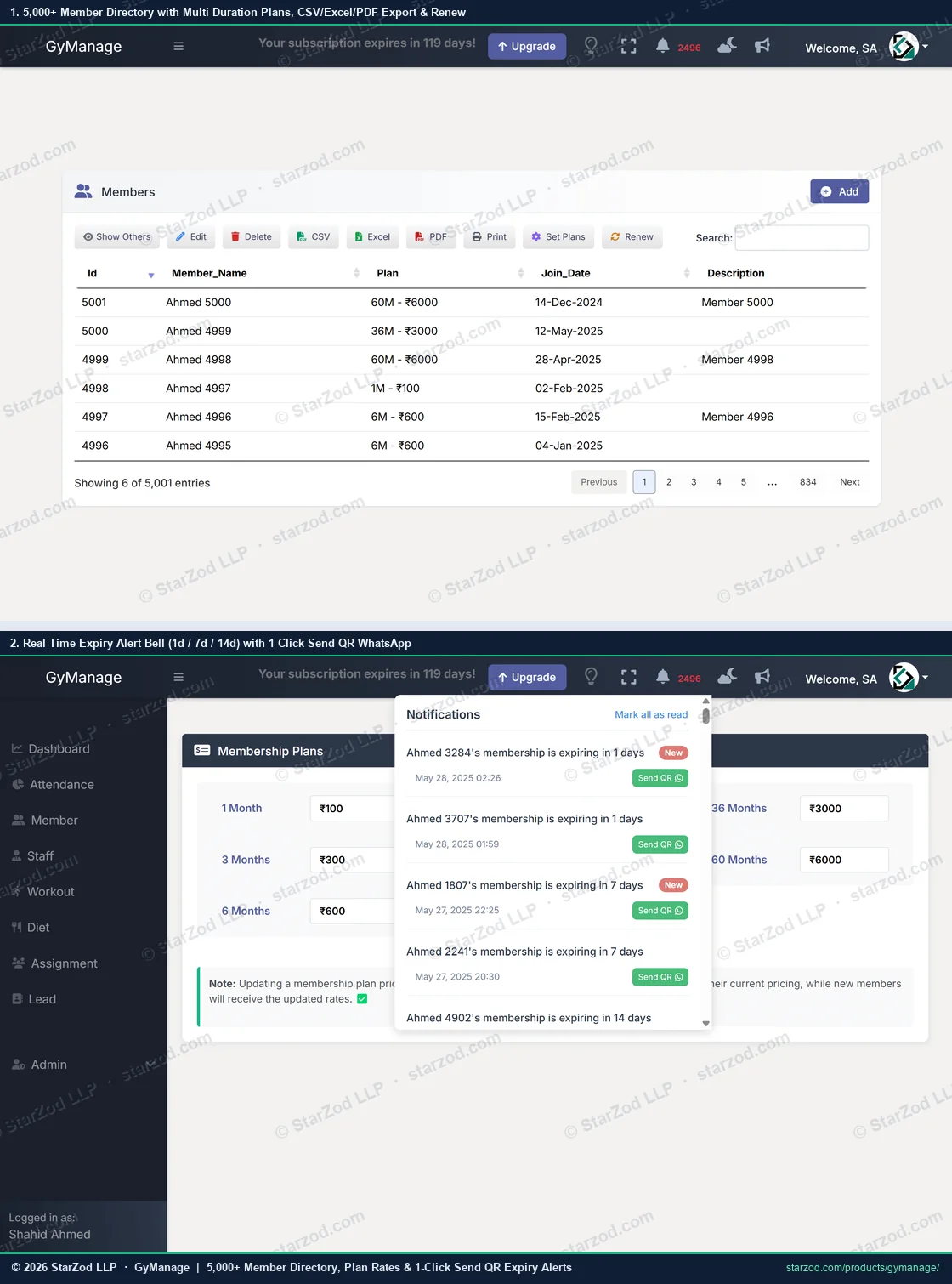
Direct Answer: GyManage watches every active plan expiration date automatically and populates a prioritized top-bar Notification dropdown separating 14-day early outreach, 7-day renewal windows, and urgent 1-day expiries with one-tap Send QR buttons.
Front-desk staff no longer have to export CSV reports every Monday just to figure out who owes fees next week. Opening the bell displays tagged New alerts alongside exact expiration countdowns and green Send QR triggers.
At the same time, the main Members directory maintains up to 5,000+ paginated entries with multi-duration badges (1M, 6M, 36M, 60M), live search, Renew action buttons, and protected plan-rate rules so raising prices for newcomers never accidentally overcharges grandfathered regulars.
2. Converting Walk-In, Google Ads & Corporate Inquiries in Leads CRM
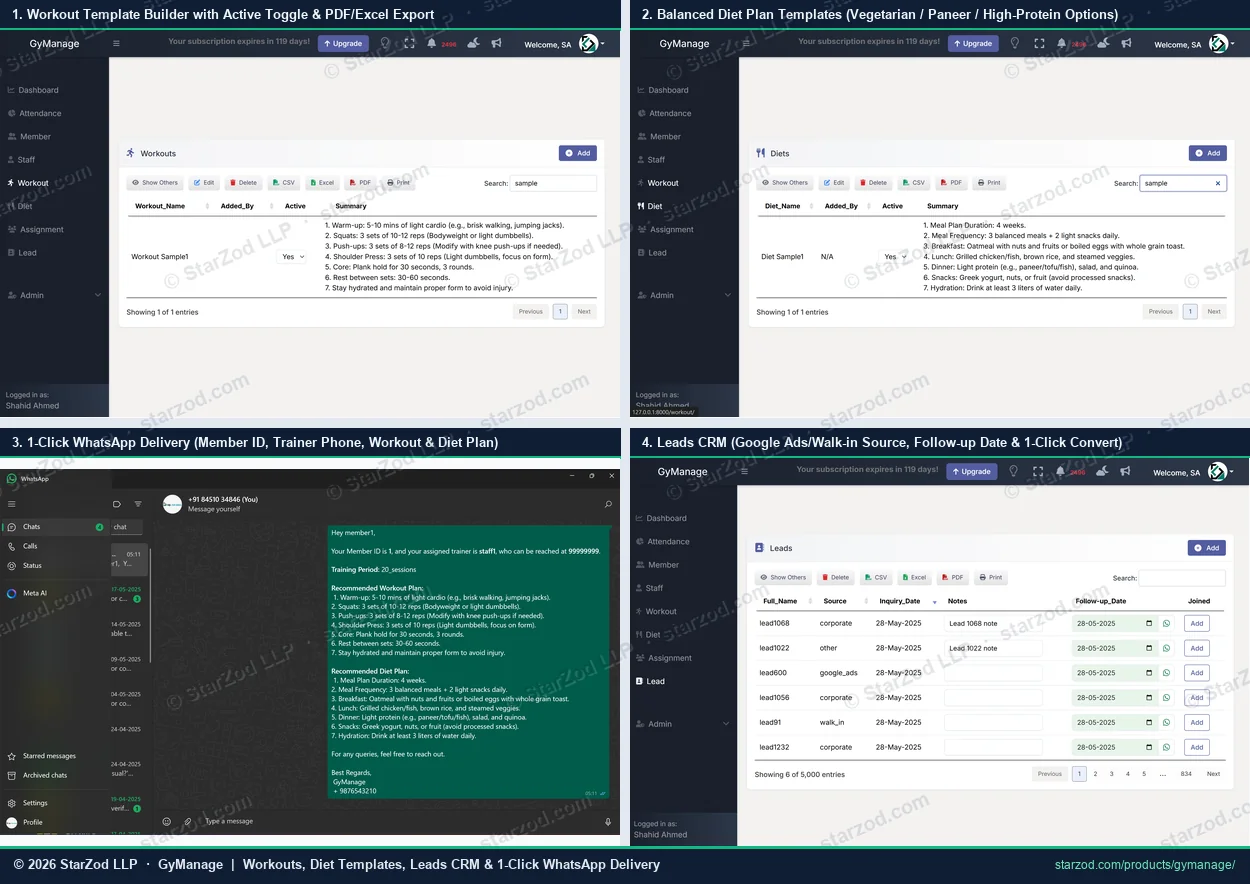
Direct Answer: GyManage Leads CRM handles up to 3,000 prospects inside a fast filterable ledger recording Source tags, Inquiry Date, Staff Notes, inline Follow-up Dates, a direct WhatsApp ping icon, and a single Add button under Joined.
On the Executive Dashboard, owners see Total Leads, New Leads This Month, Pending Follow-ups, and an automatic Lead Conversion Rate % indicator (such as 52%) in real time.
Instead of re-typing contact names and telephone numbers from inquiry slips once a trial guest decides to pay, clicking Add promotes the prospect straight into active membership onboarding with clean audit continuity.
google_ads, corporate, or walk_in, gym owners know immediately which ad channels actually convert into paid annual memberships.
3. Sending Trainer-Assigned Workout & Diet Plans Straight to WhatsApp
Direct Answer: From Workouts, Diets, and Assignments tables, staff pair any member and trainer with structured routines and fire a formatted multi-line summary over WhatsApp showing Member ID, Trainer Name and Contact, Training Period, Workout Steps, and Diet Plan.
GyManage Workout templates support warm-up guidance, compound exercise sets, core holds, rest timers, hydration reminders, inline Active switches, and Excel/PDF exports. Diet templates include vegetarian and mixed meal presets (including oatmeal, boiled eggs, grilled chicken/fish, or paneer/tofu/fish dinner swaps).
Better yet, trainers logging into their standalone Staff Check-In Portal can create custom Diet templates directly across 15+ goal categories (Overall Fitness, Weight Loss, Weight Gain, Muscle Building, Endurance, Strength, Flexibility, Balance, Cardio, Rehabilitation, Functional Training, Athletic Performance, Mental Focus, Stress Reduction, Energy Boost).
4. Fast Assignment Dispatch Across Light & Dark Operational Views
Direct Answer: Every Assignment row tracks Member, Trainer, Workout, Diet, Training Period (1 Session to 9 Months or 20 Sessions), Status, Notes, Created Date, and a 1-click WhatsApp resend icon inside both light and full Dark Mode interfaces.
During late-evening coaching hours or dimly lit reception desks, switching on GyManage Dark Mode reduces eye strain while preserving high-contrast table controls, Show Id toggles, and Hide Others operator filtering.
Coaches see only relevant active members without hunting through outdated archive folders, keeping trainer utilization balanced across Full Day, Morning, Night, Split Shift, and Weekend rosters.
Start Today on GyManage or Commission a Custom Multi-Branch Fitness Platform
Independent gyms, Yoga studios, Pilates rooms, and functional fitness boxes start immediately on GyManage with a 30-day free trial. When multi-city chains or premium clubs across India, UAE, UK, USA, or Singapore need bespoke domain portals, StarZod engineers them cleanly:
💳 Online Checkout & Websites
Sub-600ms gym websites integrated with Razorpay, Stripe, online free-pass bookings, and automatic Lead CRM capture.
🚪 Optical Biometric Turnstiles
Connect physical barrier doors and RFID readers with expired-member auto-lock rules across multi-branch locations.
🏢 Consolidated Chain HQ Analytics
Monitor consolidated revenue, trainer payroll, class waitlists, and location P&L inside one private-owned dashboard.
How GyManage Retention Automation Compares to Manual Workflows
| Member Lifecycle Stage | GyManage Automated Workflow | Manual Register / Basic Tool |
|---|---|---|
| Trial & Walk-In Inquiry | Leads CRM: Source, inline Follow-up Date & 1-click Joined Add | Paper diary entries never followed up past Day 2 |
| Day 1 Onboarding | 1-click WhatsApp card: Member ID, Trainer phone, Workout & Diet | Verbal instructions forgotten by member after Day 1 |
| Diet Personalization | 15+ trainer-editable categories with veg/non-veg options | Generic photocopied chart pasted on gym noticeboard |
| 14d / 7d / 1d Expiries | Live top-bar Notification Bell + instant Send QR WhatsApp button | Discovered only weeks after member stops attending |
| Rate Updates Over Time | Protect existing members on enrolled rates during Set Plans edits | Manual confusion at reception desk over renewal fees |
Fast 3-Step Setup Inside GyManage
Standardize Workout & Diet Library
Save reusable goal-based Workout and Diet templates once or let trainers author custom plans from their Staff Portal.
Log Every Inquiry in Leads CRM
Tag walk-ins, corporate groups, and ad traffic cleanly, review daily Follow-up Dates, and convert buyers with 1-click Add.
Clear Daily Expiry Alerts
Review the top Notification Bell each morning and tap green Send QR buttons to secure renewals on time.
Frequently Asked Questions
It formats a complete coaching message displaying the member ID, assigned trainer name and contact number, selected training period, numbered 7-step workout instructions, numbered 7-point meal plan recommendations, and gym support contact info.
Yes. Inside their standalone Staff Check-In Portal, trainers have dedicated + Add buttons for Created Diets and Created Workouts covering 15+ goal categories including Weight Loss, Muscle Building, Strength, and Rehabilitation.
The notification queue automatically highlights expiring accounts at intervals like 1 day, 7 days, and 14 days left, providing direct Send QR WhatsApp buttons next to each member alert.
Leads CRM tracks Source (such as corporate, google_ads, walk_in, or other), Inquiry Date, staff Notes, inline editable Follow-up Dates, a direct WhatsApp trigger, and 1-click Joined conversion.
Yes. Standard studios run lean 1-click WhatsApp workflows natively on GyManage without API per-message markups, while multi-branch franchises can commission official automated webhook campaigns through StarZod custom engineering.
 ✓
Continue Reading: GyManage & Fitness Software Series
Verify live capabilities, plans, and architecture resources directly on StarZod:
Launch GyManage Free for 30 Days or Book a 5-Min Demo
Run up to 5,000 members cleanly in India (₹3,540+ / 3M) or Worldwide ($150+ / 3M), or message Shahid Ahmed for a custom gym website and chain portal.
