
Financial blind spots destroy more profitable fitness businesses than lack of demand. When receptionists collect cash renewals into untracked notebooks, edit past amounts silently, or export complete member phone databases right before opening a rival studio down the street, gym owners lose both revenue and client trust. GyManage bakes practical governance directly into billing, payroll, and user access screens.
1. Online/Cash Toggle Control & Instant Provisional PDF Receipts
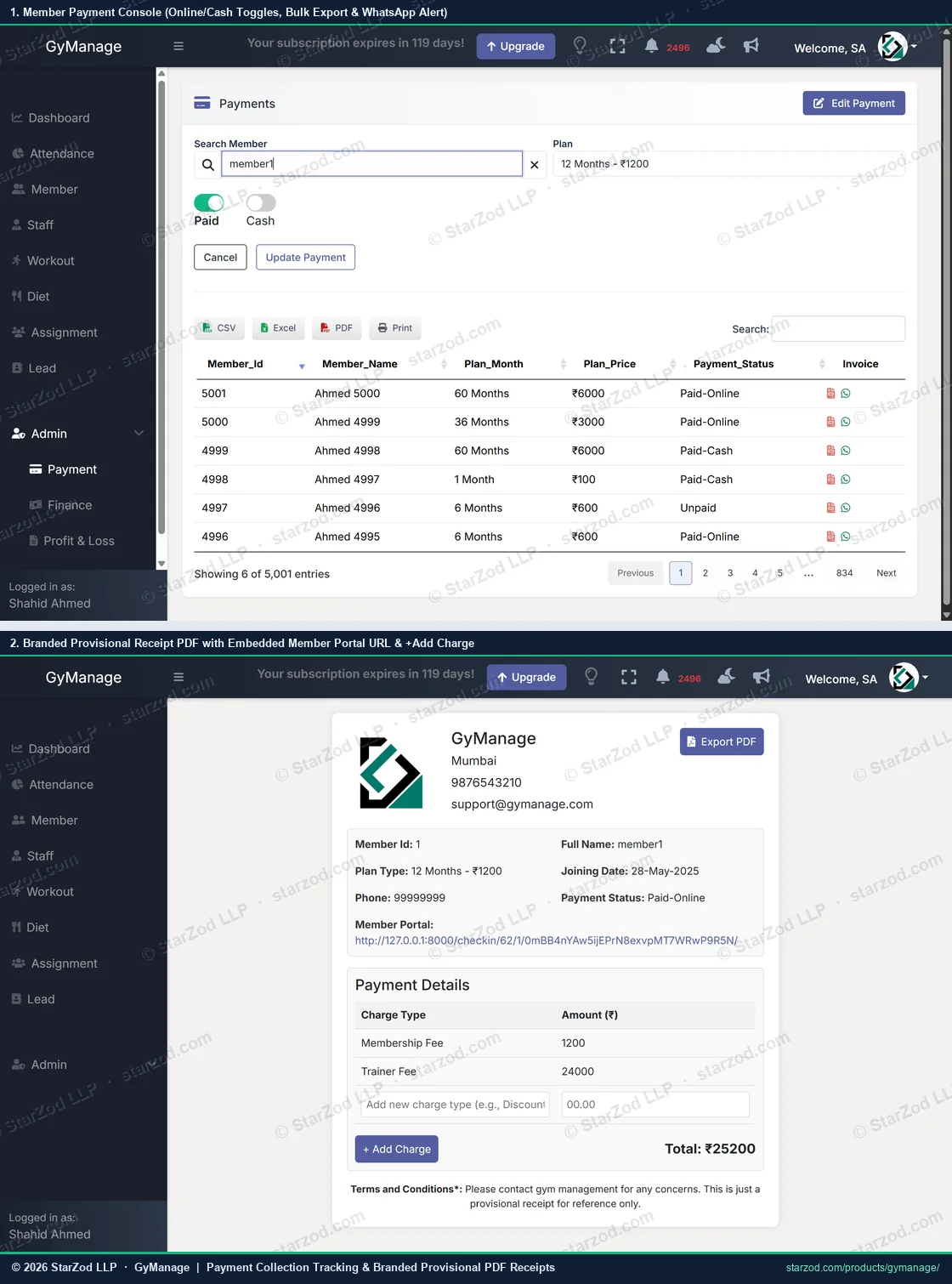
Direct Answer: From Admin > Payments, authorized staff look up any member by name, verify their plan duration and rate, toggle Paid and Cash switches cleanly, and generate either a Provisional Receipt PDF or 1-click WhatsApp invoice reminder straight from every table row.
Each generated Provisional Receipt automatically carries your gym custom business logo, location, contact email, Member ID, Plan Type, Joining Date, Payment Status, and a dedicated clickable Member Portal link so members bookmark check-in access immediately.
At the bottom of the invoice table, managers can use + Add Charge to append lockers, registration charges, personal training add-ons, or promotional adjustments cleanly while maintaining a transparent running Total.
2. Finance Ledger & Annual Profit & Loss Statements
Direct Answer: Beyond membership fees, GyManage Finance Ledger logs miscellaneous inflows like Supplement Sales alongside outgoing Staff Salaries & Commissions, automatically feeding year-filterable Profit & Loss Statements.
Inside Admin > Profit & Loss, owners select any reporting year (such as 2024 or current year), inspect Total Revenue, Total Expenses, and Net Profit/Loss headline figures, download formatted formal statements with 1 click, and inspect multi-year Revenue vs Expenses comparison charts.
Combined with Dashboard real-time metrics for Pending Amount, Overdue Payments by Member, and Salary to Pay This Month, club partners gain audit-grade financial clarity without separate accounting licenses.
3. How 36-Permission Role Access Prevents Deletion & Data Poaching
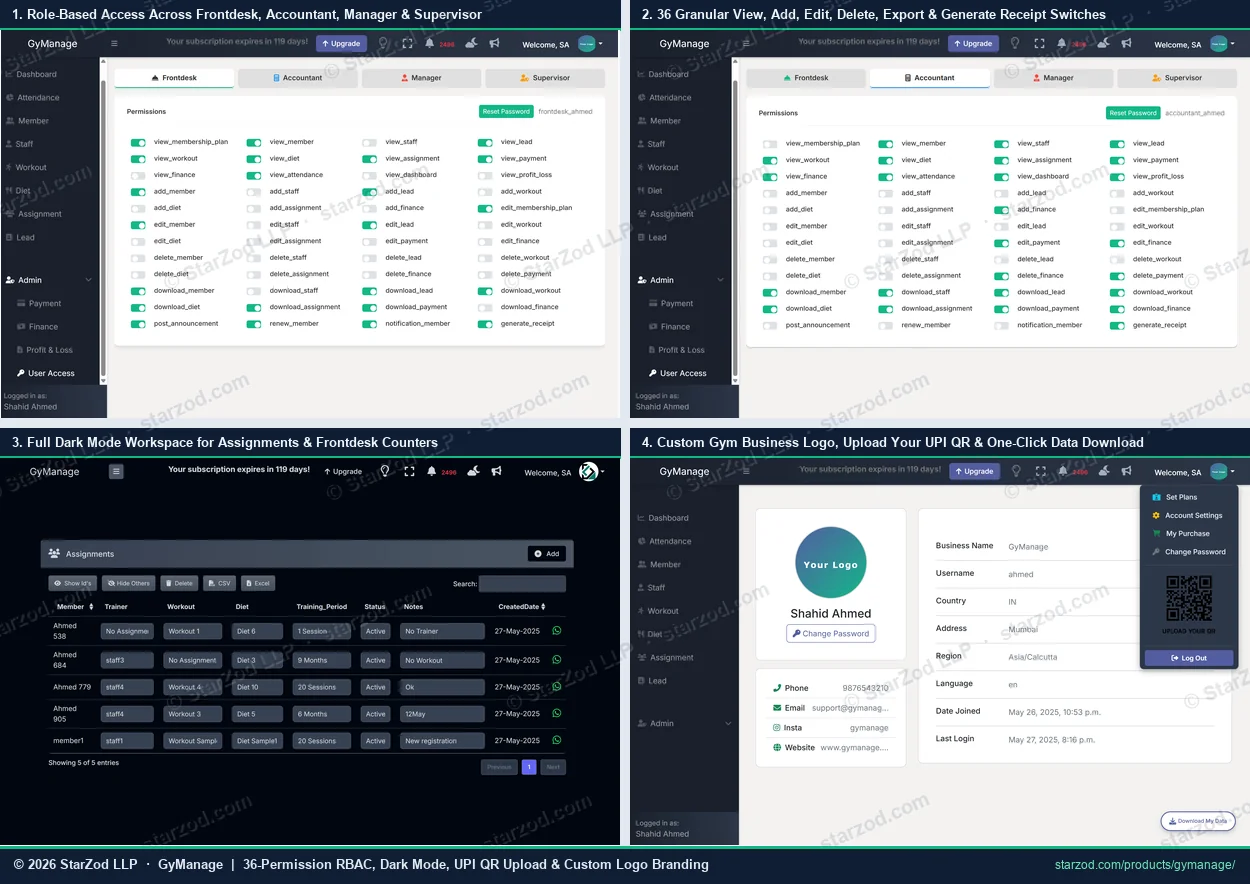
Direct Answer: GyManage separates daily operations across four distinct built-in roles - Frontdesk, Accountant, Manager, and Supervisor - governed by 36 individual toggles plus per-role Reset Password controls and phone-number masking.
For example, an owner can allow Frontdesk staff to add_member, add_lead, renew_member, and generate_receipt while turning OFF delete_member, delete_payment, view_profit_loss, edit_membership_plan, and download_member CSV exports.
Meanwhile, assigning the Accountant role restricts sidebar menus solely to Admin Finance, Payments, and Profit & Loss views while locking brand logo/settings edits automatically.
4. Personal Gym Branding & 1-Click Owner Data Downloads
Direct Answer: GyManage adapts completely to your club identity by displaying your uploaded gym logo across admin headers, check-in portals, and PDF receipts, while providing a dedicated Download My Data safeguard so you never lose access to your own business records.
Inside Personal Brand settings, owners manage Business Name, Country, City Address, Regional Timezone, Language, Contact Phone, Official Email, Instagram Handle, and Gym Website links.
Unlike closed platforms that trap club histories unless you stay subscribed indefinitely, GyManage treats club owners fairly with straightforward exports across Members, Staff, Leads, Finances, Payments, and full profile backups.
Start Today on GyManage or Commission a Custom Multi-Branch Fitness Platform
Independent gyms, Yoga studios, Pilates rooms, and functional fitness boxes start immediately on GyManage with a 30-day free trial. When multi-city chains or premium clubs across India, UAE, UK, USA, or Singapore need bespoke domain portals, StarZod engineers them cleanly:
💳 Online Checkout & Websites
Sub-600ms gym websites integrated with Razorpay, Stripe, online free-pass bookings, and automatic Lead CRM capture.
🚪 Optical Biometric Turnstiles
Connect physical barrier doors and RFID readers with expired-member auto-lock rules across multi-branch locations.
🏢 Consolidated Chain HQ Analytics
Monitor consolidated revenue, trainer payroll, class waitlists, and location P&L inside one private-owned dashboard.
GyManage Role-Based Security Matrix Across Team Positions
| Operational Module / Action | Frontdesk Example | Accountant Example | Manager / Owner |
|---|---|---|---|
| Add Members, Leads & Renewals | Allowed (Onboarding & Inquiries) | View-only or restricted | Full control |
| Delete Members / Payments | Locked OFF (Prevents silent removal) | Controlled by audit policy | Full control + CSV backup |
| Download Member Database CSV | Locked OFF (Stops database export) | Controlled for reconciliation | Full export & Download My Data |
| Profit & Loss + Salary Ledger | Hidden from Frontdesk view | Enabled (Payment, Finance, P&L) | Full multi-year P&L download |
| Edit Membership Plan Rates | Locked OFF (Prevents unauthorized discounts) | Locked OFF (Protects tariff schedule) | Protected Set Plans editor |
Fast 3-Step Setup Inside GyManage
Upload Club Logo & UPI QR
Set your gym business identity and payment QR code inside Account Settings so every PDF receipt looks official.
Configure 36 Role Permissions
Toggle exact view, add, edit, delete, export, and receipt switches for Frontdesk, Accountant, Manager, and Supervisor logins.
Reconcile Cash, Online & P&L
Monitor daily cash vs online toggles, log supplement and salary entries in Finance, and export clean Profit & Loss summaries.
Frequently Asked Questions
GyManage provides dedicated role profiles for Frontdesk, Accountant, Manager, and Supervisor, each controlled by 36 individual toggles including view, add, edit, delete, download/export, post_announcement, renew_member, notification_member, and generate_receipt plus Reset Password.
No, unless you explicitly toggle delete_payment or edit_payment ON for a specific role. Most gym owners disable delete and export permissions for reception while keeping add_member, renew_member, and generate_receipt enabled.
Every exported PDF includes your gym business header and custom logo, Member ID, Full Name, Plan Type, Joining Date, Phone, Payment Status, itemized Membership and Trainer fees, flexible +Add Charge items, and the member unique Check-In Portal link.
Yes. The top profile menu provides a direct Upload Your QR tool alongside Account Settings, Set Plans, My Purchase, Change Password, and Download My Data.
Yes. Admin > Profit & Loss compiles Membership collections, Finance inflows/expenses, and Staff Salaries by selected year with 1-click formal statement downloads and multi-year comparison charts.
 ✓
Continue Reading: GyManage & Fitness Software Series
Verify live capabilities, plans, and architecture resources directly on StarZod:
Launch GyManage Free for 30 Days or Book a 5-Min Demo
Run up to 5,000 members cleanly in India (₹3,540+ / 3M) or Worldwide ($150+ / 3M), or message Shahid Ahmed for a custom gym website and chain portal.
